

TIFF Tips
Many items in the Library's collections are in TIFF format or are what is known as a TIFF (tagged image file format) image. A TIFF image has a file extension of “.tif” or “.tiff” that your computer uses to handle the image properly. If you are having trouble viewing a TIFF image, please refer to the tips below or consult your computer's warranty provider for more help.
The Library of Virginia gives no warranty, expressed or implied, for the software application and/or documentation provided, including, without limitation, warranty of fitness for a particular purpose.
You may want to have all .tif files open immediately after downloading. This is possible in most modern browsers.
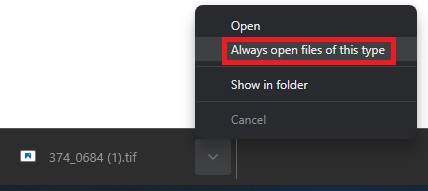
Open Automatically from Google Chrome
When a .tif file is downloaded in Google Chrome, a box at the bottom left shows the file name with a caret icon next to it. Click the caret to bring up the menu, and select "Always open files of this type".
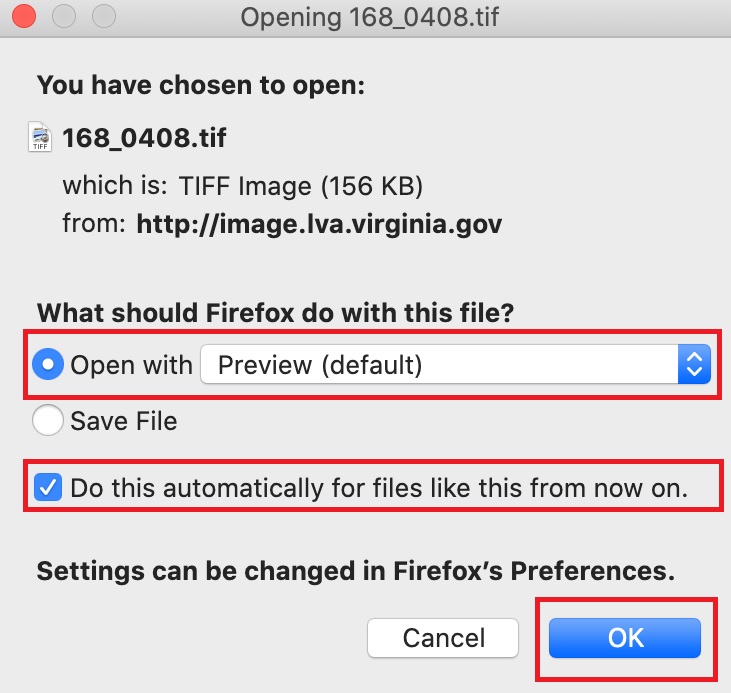
Open Automatically from Firefox
When a .tif file is downloaded in Firefox, a box will appear. Select Open With [the name of the application you would like it to open in]" and check the "Do this automatically for files like this from now on."
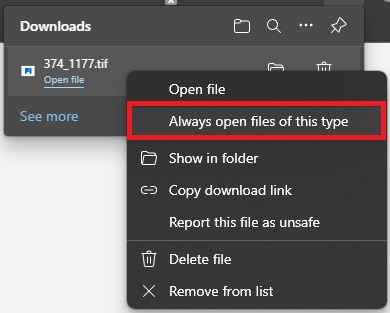
Open Automatically from Microsoft Edge
When a .tif file is downloaded in Microsoft Edge, a box pops up in the top right corner. Right click the name of the downloaded file, and select the "Always open files of this type" option.
Unfortunately, modern browsers on Windows no longer support viewing the TIFF format directly in the browser, so users must use a viewer application on their computers. By default, TIFF files open with Windows Photo Viewer. Alternative options for viewing multi-page TIFF files are as follows:
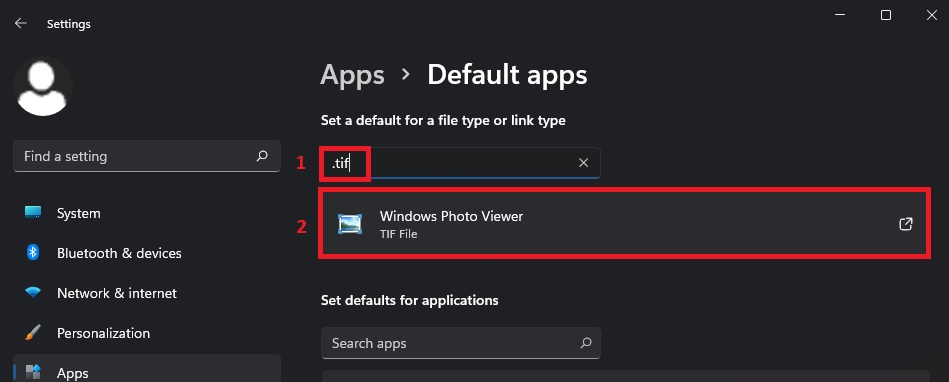
To change the default .tif file viewer in Windows, go to Settings > Apps > Default apps
Type .tif in the "Enter a file type or link type" box, and then click the "Choose a default" box directly below that. It should say 'Windows Photo Viewer' by default. A list will show up with all of the applications that may be used to open .tif files
For various problems with TIFF files, please contact Apple and supply them with a description of your problem.
Safari is the only browser known to be compatible with the TIFF image type. If that doesn't work for you, please use the "Preview" application built into Mac OS.
Please contact the webmaster at the Library of Virginia with any further questions.


